Foundauto_awesomePhoto series · 12 piecestoll2 Mark 1876 A · Prussia · William Inewtoll5 Euro 2023 A · GermanynewtollKrugerrand 1 oz · South Africa · goldnew
Step 4 of 8 · Set up
Valuable pieces in detail
Record your most valuable pieces with detail shots — front, back, signature or hallmark.
File the purchase receipt, appraisal or certificate with the piece — so its origin is on record.
receipt_longPurchase receipt·orworkspace_premiumAppraisal or certificate
toll2 Mark 1876 A · Prussiareceipt_longReceipt 1998workspace_premiumAppraisalauto_awesomeOWNY readsPurchase price DM 280 · 1998verifiedProvenance on record
receipt_longworkspace_premium
Step 6 of 8 · Fill in
Reference values
OWNY looks for comparable offers and names a non-binding range; precious metal you link to the daily price.
infoThe video only loads from YouTube once you click. Your browser then sends data such as your IP address to Google. More in our privacy policy.
A look inside
Digitise a stamp collection. One photo, every stamp.
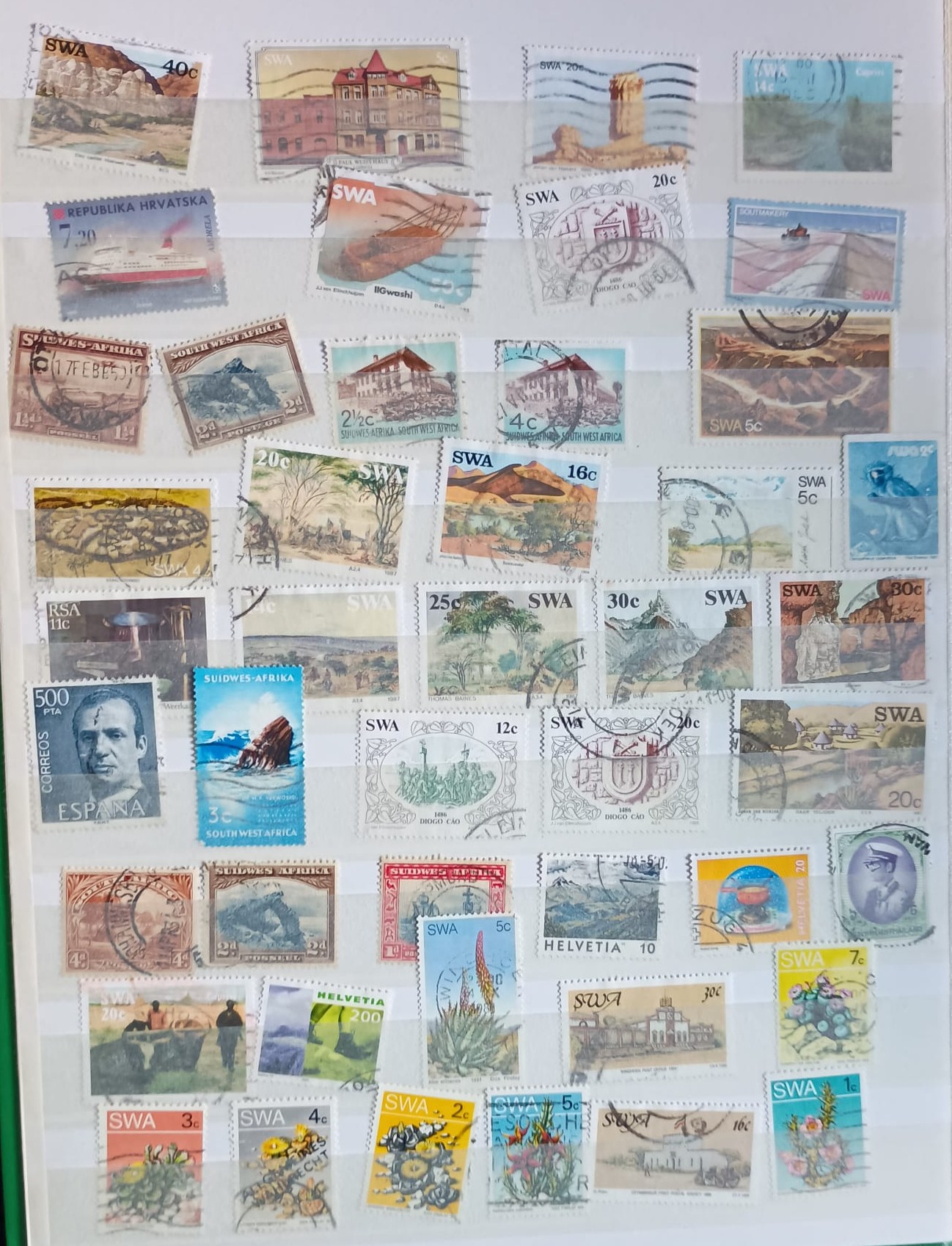
One page of a stock book, photographed once: OWNY frames each of the 45 stamps, names it and adds an estimate — and the whole page goes into its own collection.
From the album page to the collection. Recorded in the real app.
info
The figures shown are non-binding estimates from a sample capture.
THE STORY BEHIND IT
Why I built OWNAMIC.
Learn the story behind OWNAMIC. What a priest and a grocery store have to do with it, and how I integrate the platform into my own daily life to make room for what truly matters.
Published by Adrian, the founder of OWNAMIC - approx. 4 min read
“With OWNAMIC, I want to put a tool in everyone's hands that gives them, quickly and easily, what those evenings with my albums gave me as a boy: an overview of everything I owned, my things kept in loving order, and the certainty that nothing is lost — neither the value nor the story behind it. "
— from the founder's story
Pricing
Plans that scale with you, never with hidden fees.
All prices in euros incl. VAT, invoiced from Germany. All plans: encrypted storage in Germany, AI analysis in the EU.
auto_awesome
Included in every plan
toggle_off
OWNY can be switched off
Work entirely without AI – with a little AI balance in reserve for special cases.
photo_library
Multi-image mode
Scan multiple angles for precise object recognition.
camera_alt
AI Photo Recognition & Valuation
Auto detection & non-binding valuation of personal objects by photo.
history
Traceable Object History
Maintain a traceable log of ownership, maintenance, and condition over time.
draw
Electronic Signatures by 3rd parties
Collect signatures for repairs or maintenance on vehicles or collectibles without accounts.
swap_horiz
Seamless Object Transfer
Digital transfer of ownership records, warranties, and item history.
update
Scheduled Re-estimates
Automated re-estimate intervals (e.g. digital assets weekly, vehicles yearly).
sell
Smart Tags & Analysis
Organize for tax purposes, shared expenses between people, or custom tags.
qr_code_2
Custom QR Codes
Generate unique codes for instant physical scanning and quick file retrieval.
verified_user
Deadline Guardian
Proactive reminders for maintenance schedules, warranties, and key dates.
auto_awesome
AI Sorting Suggestions
Smart, AI-driven recommendations to automatically group and structure items.
toggle_off
OWNY can be switched off
Work entirely without AI – with a little AI balance in reserve for special cases.
photo_library
Multi-image mode
Scan multiple angles for precise object recognition.
camera_alt
AI Photo Recognition & Valuation
Auto detection & non-binding valuation of personal objects by photo.
history
Traceable Object History
Maintain a traceable log of ownership, maintenance, and condition over time.
draw
Electronic Signatures by 3rd parties
Collect signatures for repairs or maintenance on vehicles or collectibles without accounts.
swap_horiz
Seamless Object Transfer
Digital transfer of ownership records, warranties, and item history.
update
Scheduled Re-estimates
Automated re-estimate intervals (e.g. digital assets weekly, vehicles yearly).
sell
Smart Tags & Analysis
Organize for tax purposes, shared expenses between people, or custom tags.
qr_code_2
Custom QR Codes
Generate unique codes for instant physical scanning and quick file retrieval.
verified_user
Deadline Guardian
Proactive reminders for maintenance schedules, warranties, and key dates.
auto_awesome
AI Sorting Suggestions
Smart, AI-driven recommendations to automatically group and structure items.
videocam
Video recognition
Capture whole rooms or collections by video.
upload_file
File import
Bring in existing lists via CSV or PDF upload.
palette
OWNY Studio
Transform item photos into visual showcases with AI-powered studio scenes.
newspaper
OWNY News
Stay updated with legal changes, environmental developments, and financial topics of selected assets.
trending_up
Net Worth Carried Forward
Long-term growth visualization based on income, regular, and variable expenses.
insights
Daily Portfolio Insights
Engaging daily summary highlights across your entire item portfolio.
quiz
Daily Knowledge Check & Trivia
Deeper insights into history and fascinating background details about items.
bar_chart
Income & Expenses Chart
Track cashflows, acquisition costs, and maintenance expenses effortlessly.
group
Shared Spaces (Up to 5 Users)
Collaborate with up to 5 users in shared spaces with mutual insights.
grid_view
7 Specific Areas
Structured organization for Collector, Household, Wardrobe, Hobby, Tools, Legacy & more.
lock
AES-256 Encryption
AES-256 encryption protecting all sensitive object information.
videocam
Video recognition
Capture whole rooms or collections by video.
upload_file
File import
Bring in existing lists via CSV or PDF upload.
palette
OWNY Studio
Transform item photos into visual showcases with AI-powered studio scenes.
newspaper
OWNY News
Stay updated with legal changes, environmental developments, and financial topics of selected assets.
trending_up
Net Worth Carried Forward
Long-term growth visualization based on income, regular, and variable expenses.
insights
Daily Portfolio Insights
Engaging daily summary highlights across your entire item portfolio.
quiz
Daily Knowledge Check & Trivia
Deeper insights into history and fascinating background details about items.
bar_chart
Income & Expenses Chart
Track cashflows, acquisition costs, and maintenance expenses effortlessly.
group
Shared Spaces (Up to 5 Users)
Collaborate with up to 5 users in shared spaces with mutual insights.
grid_view
7 Specific Areas
Structured organization for Collector, Household, Wardrobe, Hobby, Tools, Legacy & more.
lock
AES-256 Encryption
AES-256 encryption protecting all sensitive object information.
Recommended to get started
Starter
Get to know OWNY and OWNAMIC
€ 3,49/ month incl. VAT
or 34,99 € yearly
Every OWNAMIC feature, with a smaller AI balance — for everyone who likes to enter things themselves.
check5,000 Assets of any kind – total in your account, not per month
check3 GB Storage for pictures, certificates, or manuals
checkAll editions: OWNAMIC Collection · OWNAMIC Home & Inventory · OWNAMIC Finances · OWNAMIC Order & Legacy
250points / month
Typically enough for 250 captured items · or 50 market valuations · or 5 Studio scenes. Freely combinable.
Manual entries are unlimited and use no AI balance.
Move up a plan whenever you like, step down or cancel at the end of the term. Your data stays — or you take it with you.
Questions & answers
Frequently Asked Questions
Find answers to the most common questions about OWNAMIC.
For automatic object recognition we use Google Gemini through the paid Gemini Enterprise Agent Platform. Which means: you pay for the software, not with your data. Processing takes place on servers within the European Union, and Google does not use your images and inputs to train its models. For how this works in detail, see our Data security page, our Privacy & Data Policy and our Terms & Conditions.
No. OWNAMIC does not train an AI of its own. For the AI features we use Google Gemini through the Gemini Enterprise Agent Platform on servers in the EU, and Google does not use your data there to train its models. If you would rather work without AI, simply switch OWNY off in the settings with “Without OWNY”.
The application and the database run on Hostinger servers in Frankfurt am Main; photos, documents and exports are kept in Microsoft Azure Storage, also in Frankfurt. Your content – objects, values, receipts, photos, documents and your conversations with OWNY – is stored encrypted with AES-256, and every connection is protected by TLS. Details we need in readable form to run the service, such as your e-mail address for signing in, are not additionally encrypted. When you use AI features, the content they need is sent to Google Gemini on servers in the EU. More on our Data security page and in our Privacy & Data Policy.
Not for their own purposes. To run OWNAMIC we use a small number of service providers that process your data only on our behalf – such as Hostinger and Microsoft Azure for hosting and storage, Stripe for payments and Google Gemini for the AI features on servers in the EU. Google does not use your inputs, files or the answers to train its models; to detect abuse, Google may log requests for a limited time. Beyond that, we do not share, sell, or transfer your personal or asset data to any third party for commercial, analytical, or advertising purposes. Every recipient is listed in our Privacy & Data Policy.
No. We do not sell, rent, or trade your personal data or asset information to any third party – and we never intend to. We are acutely aware of the sensitivity of the information you entrust to OWNAMIC and are fully committed to handling it with the utmost discretion, in strict compliance with applicable data protection law, including the GDPR. For the full framework governing your data, please consult our Privacy & Data Policy and Terms & Conditions.
Yes — through shared spaces. You contribute selected objects or collections to a space with up to five members. They see what you contribute; nobody but you can edit, delete or export your objects. Financial values stay hidden until you include them separately, and you can withdraw at any time. Please review our Terms & Conditions for the complete details on shared spaces.
Yes, explicitly. You can share your account with people you trust so they can help you capture and sort things. Whoever has your login sees and changes everything you see, so only share it with people you trust. If someone should only see selected things, use a shared space with up to five people, you included. Values stay hidden there until you include them.
Yes: OWNAMIC Lifetime costs €299 once — no subscription, no renewal, nothing to cancel. It includes all features, up to 20,000 objects, 50 GB of storage and 25,000 AI balance points that never expire. If you ever use them up, you can top up at any time. Lifetime applies for as long as OWNAMIC operates the service; discount codes apply to the subscription plans only.
Your objects stay fully usable — only the AI features pause. With a subscription your monthly balance renews at the start of the next period; with a subscription or OWNAMIC Lifetime you can also top up: 750 balance points cost €9.99 and never expire. Points you buy are spent only after your monthly balance.
Nothing is lost. Moving up takes effect immediately: the higher plan is billed pro rata and your AI balance rises to the new figure inside the running billing period — points you have already spent count against the new, higher balance, so the difference is available straight away. Stepping down is scheduled for the end of the running billing period: until then you keep your plan with all its benefits and can revoke the change at any time.
No object is ever deleted in the process. If your active object count sits above the lower plan's limit, every existing object stays fully usable — view, edit, export; only adding new objects is blocked until you are back below the limit or move up again.
After a cancellation your account stays in read-only mode once the paid term ends: objects and documents remain stored and visible to you, and you can export them at any time. We delete your data only when you explicitly ask us to.
Begin today
Welcome home to
OWNAMIC
Your things, gently catalogued. Your assistant, quietly attentive. Start your private inventory in minutes — keep it as long as you like.
Try it free for 14 days · no payment details · ends by itself
Then from €3.49 a month (cancel monthly) or buy once, without a subscription
Start with CollectionCollectionarrow_forwardTry it free for 14 days · no payment details · ends by itselfThen from €3.49 a month (cancel monthly) or buy once, without a subscription
We would like to understand how OWNAMIC is used. No advertising cookies.
.

 Welcome to OWNAMIC.
Founder
Your compass for value and order
Welcome to OWNAMIC.
Founder
Your compass for value and order
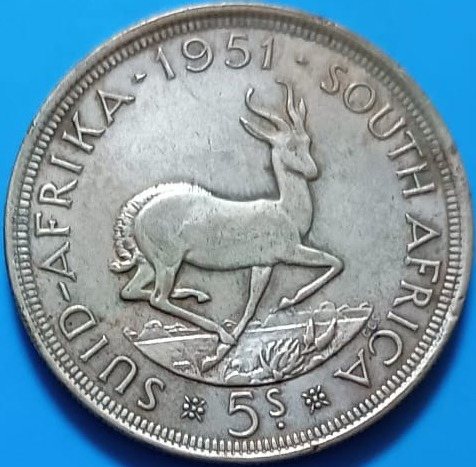
 Looking at the coin …Recognised – please check
 Pocket watch, gilded
c. 1900 · heirloom
€380–520
Pocket watch, gilded
c. 1900 · heirloom
€380–520 Ammonite
Jurassic · a find
€40–60
Ammonite
Jurassic · a find
€40–60
 SideboardPictures ×3BowlVaseVase
 Grandma's wedding ring
private until the day comes
for Jonas
Grandma's wedding ring
private until the day comes
for Jonas Piano
still open
—
Piano
still open
—
 OWNY
OWNY